Showing posts with label Email. Show all posts
Showing posts with label Email. Show all posts
Friday, 24 September 2010

Wednesday, 15 September 2010
Friday, 10 September 2010
Yahoo Mail

Yahoo Mail was introduced in 1997 and is currently the largest web-based email in the world; closely followed by it's main competitor Windows Hotmail. The Y! Mail service was updated in 2006 and users can choose between the new mode or the Classic 1997-2006 mode which may appeal to long-time users who have made use of the site since it's inauguration. Members can either become free or premium members; with premium members paying £1.50 a month for updated services including advanced spam checker and virus protection.
 Yahoo offer an online chat service- Yahoo! Messenger, in conjunction with your email account. It automatically updates your contact list with your Email recipients and senders but also gives you the option to add your own friends. This service offers you the chance to talk instantly with your online friends, either while you email or separately. Recently a video call option was added to Yahoo! Messenger allowing conversations via web cams and microphones across the world for free. It also offers a range of 'emoticons' and photo and music sharing. This chat feature is similar to that offered by MSN Messenger which is downloaded in conjunction with the creation of a Hotmail account; however Yahoo users can use this feature on their Email account and do not have to download any other programmes to utilize it. This is a good selling point of the chatting feature as there are many current Yahoo users who wish to use a video call feature on the web but don't want to set up an account on MSN Messenger or sites such as Skype; they can use this feature that is already loaded on to their account, easy to use and comes already installed with all your email contacts.
Yahoo! Mail also uses the structure of it's inbox effectively, tabbing any open messages along the header of the page, allowing you to flick between open emails and your inbox quickly without the page needing to be reloaded often. This is useful to people who made need several corresponding emails open simultaneously without having to open different Internet tabs or pages. The tabs also display the subject of the email so it's easy to check at a glance what tab you need and avoids confusion. This is extremely useful for people who may have to check several emails at once and need to refer back to other pages; the tab system allows them to do this without having to reload different pages several times which takes a lot of time and effort which you may not have.The other useful point about this tabbing system is that it gives your email inbox a good structure and ensures that you don't get lost with all the new pages that appear; this is good for first time emailers and people who just want a good basic layout to help them as they communicate. The 'blocked images' message you can see on the screen shot is Yahoo's privacy feature which does not allow the viewing of pictures in case they contain harmful viruses that may affect your computer; or Yahoo may feel the large amount of pictures may slow down the length of time it takes to load the message. This feature also blocks any links provided on the email so that potential links to harmful sites cannot be accessed unless authorized by the account manager.
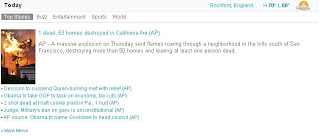 On the Yahoo! Mail homepage the recent news is displayed, as well as the weather for your location which you can set manually. The news feature could be useful to those who do not have time to check both Yahoo and their mail at the same time; it provides both services on the same page. Also clicking on a news story will open a new window or tab ensuring that you are not directed away from your Emails. By displaying the news on their website they are both promoting their other major website Yahoo! News which provides worldwide coverage of news stories; they are combining their two most popular services into one small system so users can access their emails whilst quickly keeping themselves up to date on the world news. I believe this would appeal mostly to business people who are too busy to check the news on a separate account
and the ability to check both at once is both a time saver and ensures they are aware of recent social news reports that may be relevant to their field of work.
 It also has another interesting feature: at the top of your Email homepage is a simple 'Have something to share' box. You can type your thoughts or opinions into this box and either share with Yahoo! Users (friends only or everyone) or even connect your account to Facebook and share it with all your friends. This could be useful to quickly updating your status on Facebook whilst checking your emails, eradicating the need to have to log on and saving time. This app may appeal to a younger generation who are active members of Social Networking sites such as Facebook, and to Twitter users as the 255 character limit resembles closely the limit of Tweets.

Advantages:
News story explaining Yahoo! Mail has created an iPad friendly app enabling iPad users to access their emails everywhere.
 On the Yahoo! Mail homepage the recent news is displayed, as well as the weather for your location which you can set manually. The news feature could be useful to those who do not have time to check both Yahoo and their mail at the same time; it provides both services on the same page. Also clicking on a news story will open a new window or tab ensuring that you are not directed away from your Emails. By displaying the news on their website they are both promoting their other major website Yahoo! News which provides worldwide coverage of news stories; they are combining their two most popular services into one small system so users can access their emails whilst quickly keeping themselves up to date on the world news. I believe this would appeal mostly to business people who are too busy to check the news on a separate account
and the ability to check both at once is both a time saver and ensures they are aware of recent social news reports that may be relevant to their field of work.

Yahoo! also offers users to send up to 20MB of attachments per Email, however users can download as application free to allow up to 100MB per Email- completely outstripping Hotmail's 10MB and GMail's 20MB limit. This makes Yahoo Mail popular among those who have to send large files or possibly a whole album of photos in one email, as using an Email service with a smaller attachment limit could mean having to send several emails in succession. Sending large files or many at one time is a common practice with workers in modern times; people are often required to share work documents between colleagues for feedback and to ensure the document reaches them both physically and digitally. This large file attachment could be a selling point of Yahoo mail as businesses need to choose adaptable servers that allow them to send everything they need in just one email rather than having to send several serparate ones.
 It also has another interesting feature: at the top of your Email homepage is a simple 'Have something to share' box. You can type your thoughts or opinions into this box and either share with Yahoo! Users (friends only or everyone) or even connect your account to Facebook and share it with all your friends. This could be useful to quickly updating your status on Facebook whilst checking your emails, eradicating the need to have to log on and saving time. This app may appeal to a younger generation who are active members of Social Networking sites such as Facebook, and to Twitter users as the 255 character limit resembles closely the limit of Tweets.
Advantages:
- The tabbing feature allows users to look at several sections to their email account at once without loading other pages
- Allows you to check the news and weather at the same time as checking your mail
- Includes Yahoo! Chat which allows you to chat with other contacts on your Yahoo address book that are online at that time, including video calls
- You can update a 'status' to your followers
- Unlimited space storage
Disadvantages:
- Slower than Gmail in terms of loading messages and using the text chat feature
- Isn't a good service if you need to send and receive large numbers of emails with big attachments
- The spam filter is not as efficient as Gmail's
News story explaining Yahoo! Mail has created an iPad friendly app enabling iPad users to access their emails everywhere.
News story explaining how a student from America hacked and leaked US Vice Presidential candiate Sarah Palin's private Yahoo! Emails
Thursday, 9 September 2010

G-Mail


Priority inbox on google mail, sorts the most important mail and categorises them separately so you know which ones you should read first. These e-mails are placed at the top of the inbox, and all the less important e-mails are sent further down the list so they are read last. This feature could be extremely important to users who use one G-Mail account both for work and personal use; it can ensure that important documents related to work are prioritised and can be responded to first. If you want to get back to an important message later you can mark it with a star so it is easy to spot, and is placed into another folder where mail is not deleted and can be read in the future. This could be essential to employees who need to refer frequently back to E-Mails after they've read them without worrying that important information may be deleted after a certain period of time. Tools like this are ways to help us avoid 'Information Overload'; a term "refers to the difficulty a person can have understanding an issue and making decisions that can be caused by the presence of too much information" Wikipedia. This term was used to describe the influx of technological inventions and improvements in the early 21st century which provided people with opportunities they had never had before.

 G-Mail offers one of the most effective Spam-Blockers available on the Internet E-Mail services at this time; it uses a variety of methods to try and eradicate the number of Spam messages that make it through their blockers. The above image shows clearly just how effective this is, the percentage of these spam messages is less than 1%- a remarkable comparison to the 70% prevalence of spam. Google believes "Though in many cases our best weapon is you." This is essential in their effective spam blocking; users vote with clicks to report certain email as spam. The system then learns from this feedback as to which messages are actually spam ad helps them to be eradicated from all users' inboxes. This extremely prevalent spam blocker is essential to people who use Gmail for work purposes and can't have potential viruses in their inbox or folder or don't want hundreds of spam messages amongst work emails. Spam is often disguised as messages from banks or building societies asking for personal details; these details are used by scammers to access your bank account- these can be extremely damaging to a person and good spam blockers can stop them even being read by you.
  G-Mail also has filters which can identify the sender of the e-mail; therefore you can set a filter to automatically put a star next to messages from important people which you may need to read quickly. G-Mail has already got a really effective Spam Blocker; however it also has the technology to track which Emails you actually read and block E-mails from senders whom you never open. It can also record whether you read or reply to an Email; these Senders will move higher up on the Priority List and fall into the 'Important' folder. If this feature is malfunctioning you also have the option to manually manage your account, choosing your own Important senders and E-mails. However for a system like this to work effectively and for it to be able to read your patterns and systems accurately it requires a frequent use; this enables the system to pick up and sort out your E-Mails specifically to you.
Gmail also holds host to a chat service that allows you to communicate with online contacts that are added to your Email address book; the option is situated to the side of the page so it does not interfere with you checking your emails. You can see your online contacts with small green dots to the left of their names and all other offline contacts are represented by grey icons. You can also choose to 'appear offline' so that you can see who is online but others cannot see you; so you can stop unwanted conversations being initiated. You are also able to invite, search or add contacts in a small search bar above your contact list; this can enable you to encourage others to sign up to a Gmail account and increases the popularity of the site.
Advantages:
- Faster than other competing Email services
- An extremely effective spam blocker that does exactly what it says it does
- Ever expanding space to suit everyone's space needs
- Replies are stored as one conversation so you can view the whole conversation that has occured between you without looking at past emails. Also, it doesn't create a new email so less space is wasted.
- You can search your emails for keywords, so you can always find what you're looking for
Disadvantages:
- Sacrifices privacy; Google searches for keywords used in your emails and related advertisements appear depending on the subject of the mail. A reviewer on one online site said "Might as well be called ' Big Brother' "
- Limitations on attachments.
News Stories:
Glitch in system means that everytime a G-Mail inbox is opened, music starts playing; “Whenever I sign into my Gmail using Chrome, music automatically starts playing. This is a new issue. It's like old time dance music,”
http://www.theregister.co.uk/2010/09/01/gmail_priority_inbox_jazz_hands/
Over 1 million calls were made via the G-Mail Voice function in the first 24 hours of it's release.
http://www.telegraph.co.uk/technology/google/7966800/Gmail-phone-service-used-to-place-1m-calls-Google-says.html
Subscribe to:
Comments (Atom)